
Industry Insights
The Future of Field Documentation
AI-powered reporting is changing how contractors, inspectors, and field professionals work. Here's what you need to know.
Read moreField reports from your iPhone, with 3D scans and plans
Not just photos


Drag to compare the 2D plan and the 3D model from the same scan. Real output from the app.
Scan rooms in 3D and get 2D plans you can export. Capture photos, video and voice notes, and AI writes the report with prioritized action items. Share it as a PDF or a link. Built for contractors, inspectors and field teams.
Available on the App Store for iPhone, with terrain and exterior scans.
What you get
Scans are captured on iPhone. Plans, reports and share links open on the web too.
Walk the room with your iPhone's LiDAR scanner and get a 3D model and a floor plan you can export.
New in 1.2.4
Several angles of one spot stay together, with one note and a colour. Reports show them by group, and shots taken within 90 seconds are suggested as one group.
Scan a facade for its approximate width and height, or walk the lot for a site plan. Approximate, for quoting. Not a survey.
Screen recordings of a real project on iPhone. The project name, address and user name are blurred.
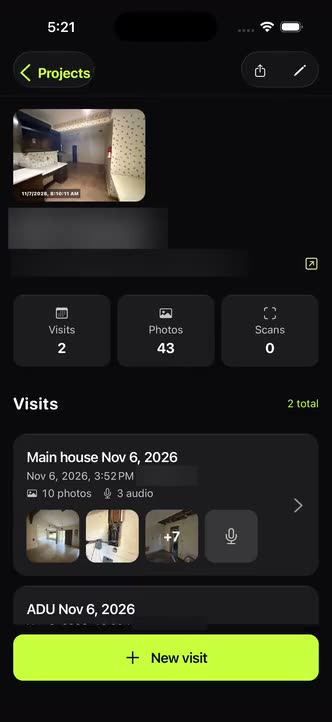
AI drafts the report from your photos and notes, with follow-up actions ordered by urgency. You review it before it goes out.
Your client opens the link without an account and can download every photo and video as a ZIP.
Talk while you walk. Your notes are transcribed and go into the report.
Shoot on site and mark up what matters right on the photo.
Step-by-step visits, so every required photo and note gets captured.
Owner, admin and user roles. Invite your team by email.
Photos, video and voice notes save on the phone and sync later. Transcription and AI reports need a connection.
How it works
Scan the rooms, shoot photos and video, and talk through what you see. No signal? It syncs when you're back in range.
AI drafts the report from your captures, with action items ordered by urgency. Edit anything before it goes out.
Send a PDF, or a link your client opens without logging in.
One photo, its voice note and the report from a real visit to count light fixtures. Nothing restaged.

There are approximately 40 of these poles where lighting can be installed to illuminate all the poles.

Generated in Spanish. Name and address blurred.
Pricing
The free trial runs on the web app. For team pricing, email us.
Start the 30-day trial on the web, or email us about pricing for your team.
Emailing us: We'll reply by email and set up a short call about your team. No commitment required.
FAQ
What reporOne does today, and what it doesn't.
Still have questions? We're here to help.
Resources
Articles on field documentation and reporting.
Industry Insights
AI-powered reporting is changing how contractors, inspectors, and field professionals work. Here's what you need to know.
Read more
Best Practices
Expert tips from industry professionals on maximizing your time in the field with mobile documentation tools.
Read moreCapture the visit on your iPhone, review the AI draft, and send your client a PDF or a link.